2. First Steps: Navigating the YC.World Interface
3. Search Mastery: How to Locate Entities Across 82 Jurisdictions
4. Analysing Search Results: Leveraging Filters for Precise Insight
5. Visualising Connections: Mastering the Graph Tool
6. Project Management: Organising and Saving Your Investigations
7. List View: Structuring Complex Corporate Networks for Analysis
8. YC.World API: Automating Corporate Research within Your Workflow
First Steps: Navigating the YC.World Interface
22 September 2026
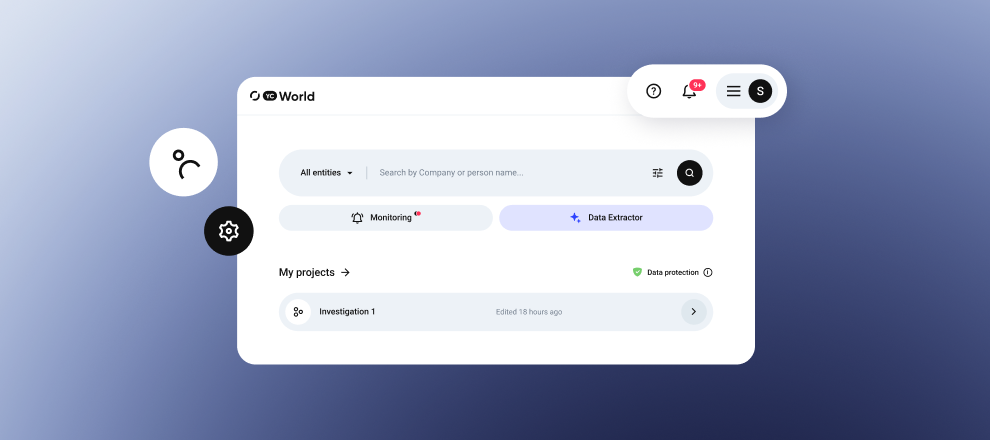
After signing in, you will see the main dashboard. The interface is designed to keep all essential tools within immediate reach, allowing you to move from a query to a result in just a few seconds.
Home Page: Everything in One Place
Search
The search bar is at the centre of the page. Use it to enter a name or code and start a check.
Below the search bar, you will find:
- Monitoring. This section contains the objects you have added to monitoring. The system continuously tracks them so you do not miss important changes.
- Data Extractor. An AI-powered assistant for processing content in different formats. Paste an article, video, audio file, link or uploaded document, and the extractor will automatically identify entities that can be added to the graph.
- Projects. This is your investigation archive. It stores all previously created investigations. You can edit them, share them or create a copy.
Your Account
All administrative functions are grouped in a convenient side menu, often referred to as the burger menu.
1. Privacy and Security
You can secure your profile by enabling two-factor authentication through Google Authenticator or by updating your password. This section also provides information about your licence and its expiry date.
2. Trace Settings
YC.World automatically highlights risks. You can:
- Select up to seven countries for trace detection. By default, the system includes the highest-risk jurisdictions, such as Russia, Belarus, Iran and others.
- Set the depth of relationship searches up to the third level.
3. Interface Language
The interface is available in English and Ukrainian.
Resources
The top section of the page contains resources that can support your work:
- Data Coverage: a detailed overview of more than 291 data sources.
- YC.World Academy: training materials and webinars.
- Blog: recent compliance news and product updates.
- Notifications: when new information appears in the system or the status of an object under monitoring changes, a red indicator will appear on the notification icon.
FAQs
Can other users in my company see my Projects?
By default, your projects are visible only to you. However, you can use the Share feature to grant colleagues access to collaborate on a specific investigation.
Can I upload data from a YouTube video or podcast to the Data Extractor?
Yes. Simply paste the link to the video or audio file. The AI algorithm will process the audio track, transcribe it and identify the companies or names mentioned in the conversation.
How many entities can be monitored at the same time?
The number of entities depends on your subscription plan. You can always check the current limits in the My Licences section of your profile menu.
How often is the information in Data Coverage updated?
The data is updated regularly. The date of the latest update for each specific register is available directly on the Data Coverage page.